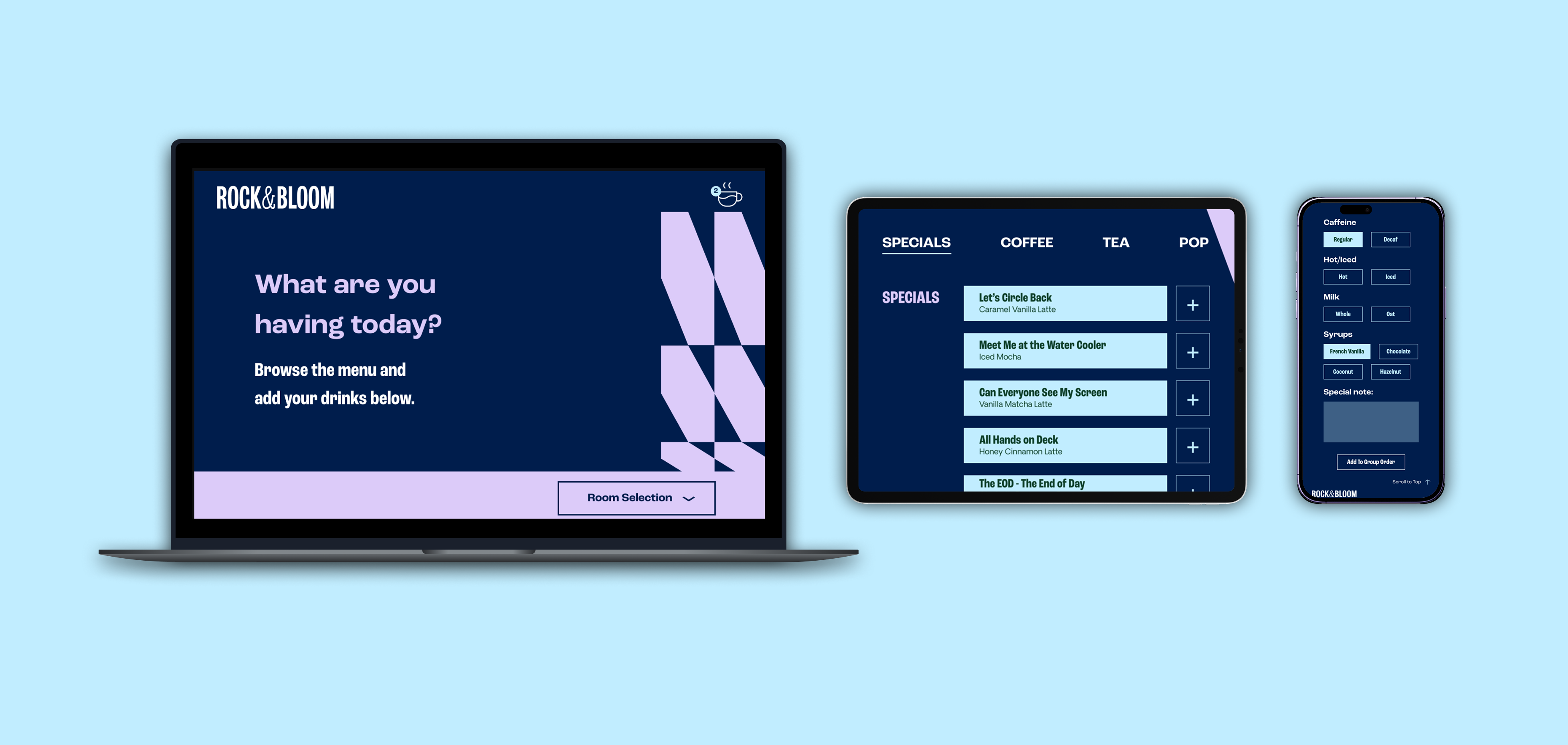
During my internship at Rock & Bloom, I developed a custom coffee ordering web application. The goal was to replace manual, fragmented ordering processes with a centralized, user-friendly digital solution that the team could rely on daily.
The name "Rock & Bloom" is inspired by the agency's brand identity and symbolizes connection, support, and crossing paths with people who share similar goals.
Initially, the agency needed a simple interface to manage office beverage requests. There is currently no streamlined way for clients visiting the office to place beverage orders. There is a process in place to capture preferences ahead of time, but it is a simple google form. I needed to move from designing a "simple webpage" to engineering a system that could actually capture and process data. This project creates a self-service system that:
- Presents a clear menu of all available drinks and customizations
- Allows multiple clients to add their orders simultaneously before a group checkout
- Automatically notifies staff via Slack when an order is submitted
- Enables clients to save preferred orders in advance for future office visits
How can I build a seamless ordering experience that hides complex backend automation behind a clean, agency-branded interface?
Stack & Workflow
To deliver a professional-grade experience within a short timeframe, I utilized:
- Framer (React & TypeScript): For high-fidelity UI design and responsive layouts.
- Make.com & Slack: To handle the backend logic, connecting user inputs to the database.
- Custom Integration: Creating the bridge between form submission and order logging.
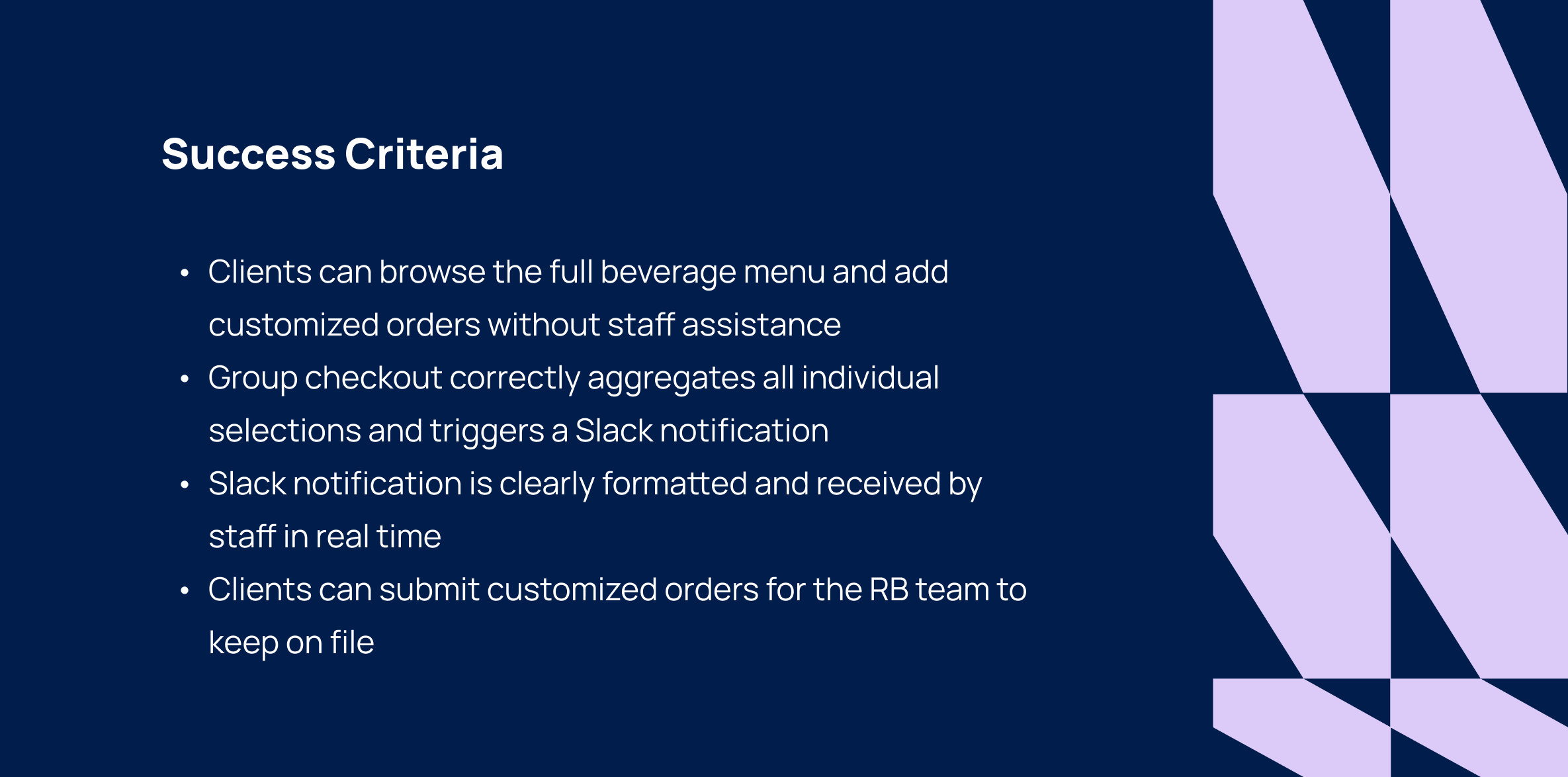
The system was built around five core requirements to ensure a smooth, efficient ordering routine for the agency team:
-
Dynamic Beverage Menu
- Diverse offerings including specialty drinks (lattes, cappuccinos, signature blends) and refreshers.
- Granular customization logic for milk preferences (whole, oat) and syrup flavors.
-
Collaborative Group Ordering
- Real-time session management allowing multiple users to add items simultaneously.
- Shared cart view to aggregate selections, ensuring order accuracy before final submission.
- Streamlined checkout flow that processes the entire group’s order as a single batch.
-
Automated Slack Integration
- Webhook-driven notifications triggered instantly upon checkout.
- Formatted order summaries delivered to a dedicated channel for quick preparation.
-
Persistent User Preferences
- Meeting room selection
- Easy edit flow to update preferences as tastes change.
-
Mobile-First Interface
- Touch-optimized UI designed for quick interaction on tablets and smartphones.
- High-contrast tap targets and minimal text input to reduce friction.
- Fluid responsiveness across both landscape and portrait orientations.
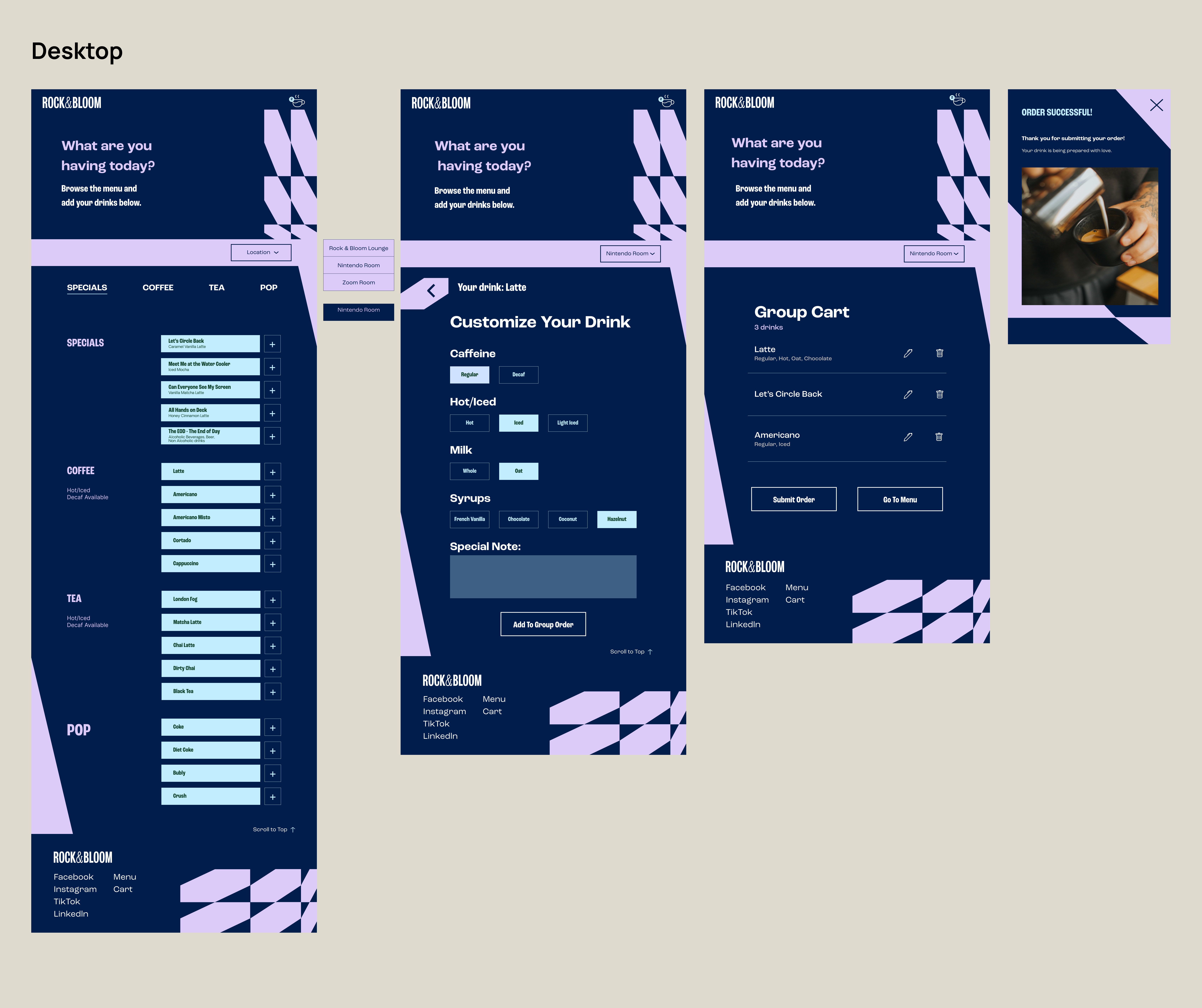
I mapped out the essential ordering sequence to minimize friction, ensuring the app remains intuitive for multiple users while handling persistent state management across the session.
- Select a Room: The main menu prompts the user to lock in a meeting location (Lounge, Nintendo Room, or Small Room). This context is preserved throughout the group session, with logic managed in RoomStorage.tsx.
- Customize Drinks: Users browse the menu and click the (+) button to enter the customization flow. Here, they can adjust temperature, milk, syrup, and add special instructions, powered by CustomizeForm.tsx and TeaCustomizeForm.tsx.
- Group Cart: Drinks are aggregated into a shared group cart. This allows multiple team members to contribute to the same order without re-entering the room selection, handled via GroupCart.tsx`.
- Order Submission: Clicking "Submit Order" triggers the data push to Make.com. Once confirmed, the app clears the cart, resets the room choice, and presents a success screen to the user.
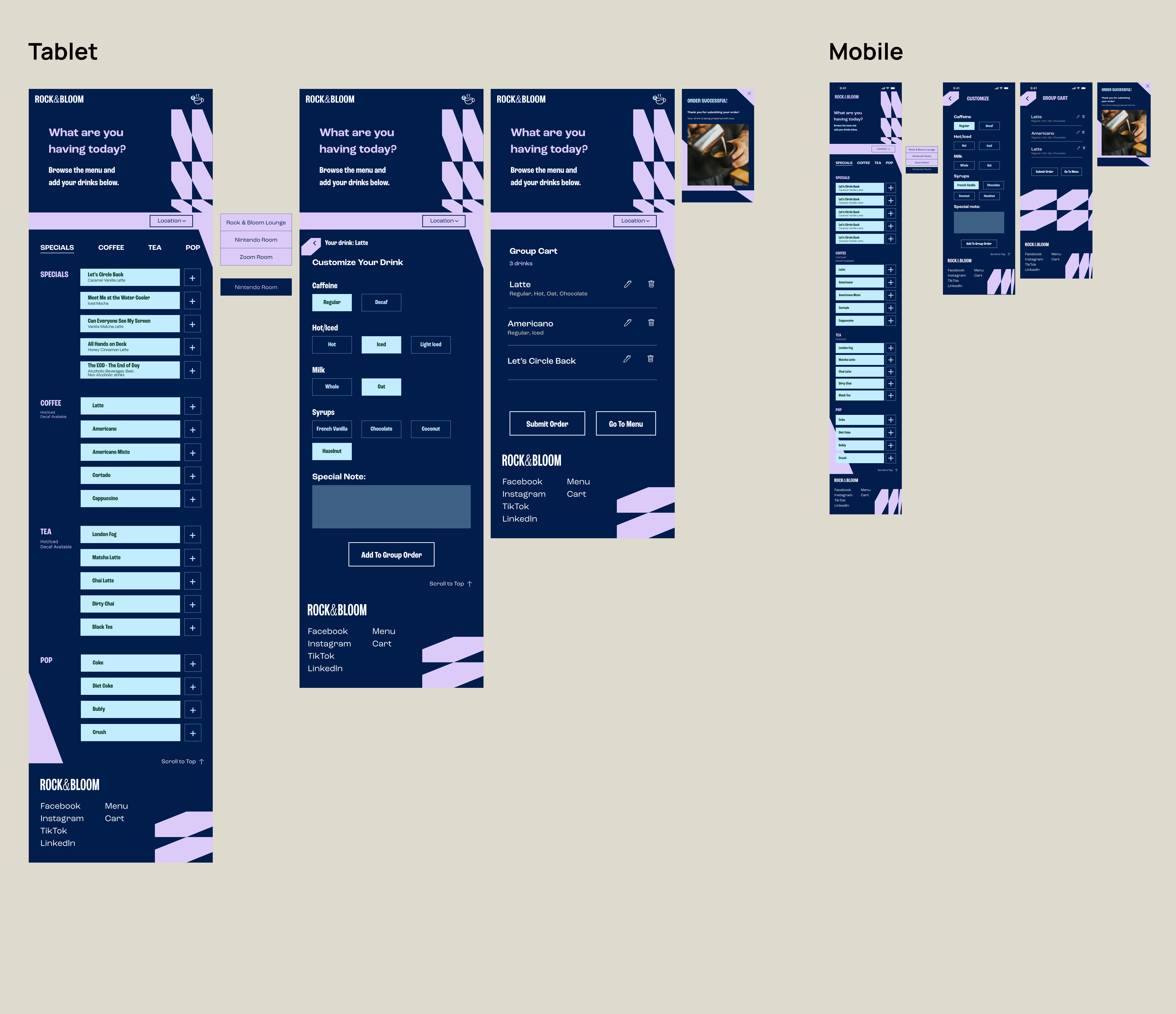
For this project, I developed high-fidelity wireframes to establish the application's structure. This stage was critical for determining the exact layout of the room selection process, menu hierarchy, and the customization modal.
By building out these high-fidelity frames early on, I was able to test the logic of the "cart" and "room-selection" mechanisms to ensure the user flow felt intuitive before committing to the final visual layer.
Note that the final design incorporates these wireframe elements with enhanced visual polish and user experience refinements.
Goals
- Assess the speed and clarity of the ordering workflow.
- Validate if the "Room Selection" mechanism is intuitive enough to prevent errors.
- Ensure the customization modal (Milk/Syrups/Temps) is fast to navigate.
- Verify that users understand the "Group Cart" functionality versus individual submission.
Testing Tasks
- Room Selection: Open the app and select a meeting room. Attempt to switch rooms mid-flow to see if the system handles the transition clearly.
- Customization Flow: Browse the menu and add three distinct drinks with different customizations (e.g., oat milk, extra syrup).
- Group Review: Add an order as a "second user" and review the shared cart to ensure the order is aggregated correctly.
- Submission: Complete the checkout flow and verify the order confirmation screen triggers.
Key Takeaways
- Cart Friction: Early testers found the "Group Cart" slightly confusing when multiple people were ordering. I simplified the cart view to focus on single group order.
- Input Speed: The customization modal was initially too deep. I reduced the number of clicks required to add a drink by defaulting common settings (like temperature).
- Automation Confidence: Users expressed a need for confirmation that the Slack notification was sent. I introduced a "Success" overlay that confirms the order has been relayed to the kitchen.
What I Learned
This project was my first opportunity to collaborate closely with another intern in a professional agency environment. It taught me the importance of clear communication, aligning design visions, and exercising leadership in problem-solving. I learned that the best solutions often come from narrowing down scope to prioritize core functionality over "feature creep."
Technically, this project was a significant milestone for me. Integrating the end-to-end data pipeline—connecting front-end inputs to Make.com and triggering automated Slack notifications—was new territory. Navigating these backend structures independently gave me the confidence to bridge the gap between design and functional development.
Challenges
Next Steps
Looking forward, my goal is to continue bridging the gap between high-fidelity design and functional backend integration. I plan to deepen my proficiency with Framer’s advanced interactive capabilities while simultaneously expanding my backend development skills. Mastering this intersection will allow me to build even more robust, data-integrated web applications for my future projects.